First run
After installation on first run Stonito Lotto does not have any lotto game installed. First you are presented with a choice of using any of the predefined lotto games in your collection of games.
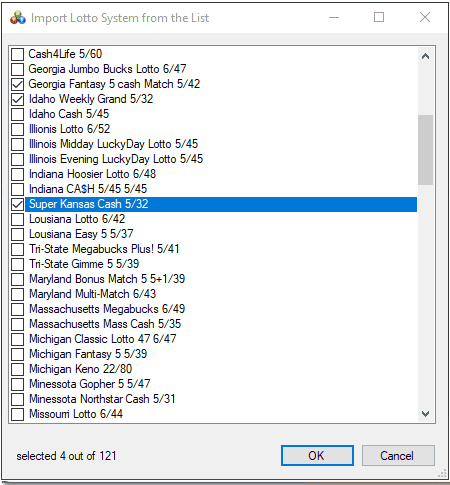
This is done by simply selecting one or more from the list. All of them come with an extensive history of drawings going back decades in the past. You will maybe have to add a few most recent rounds but it is not a tedious task. If you don't want to import any of the lotto games from the list, than you will be presented the choice to add one game manually.
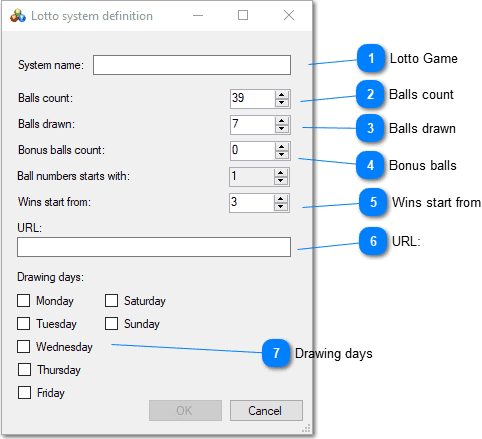
 Lotto Game
Name of the Lotto game as a game identifier in Stonito Lotto
 Balls count
Total number of balls used in drawing. They always start from the number 1
 Balls drawn
How many balls are picked in the main drawing.
 Bonus balls
Are the bonus balls used. Stonito Lotto supports only bonus ball(s) that are drawn from the balls left after main drawing was finished. In the case of special bonus balls, that are drawn independently there is no reason to be treated as part of a drawing.
 Wins start from
Every combination in a ticket that has more or the same count of matches with a winning combination will be specially marked in the list.
 URL
URLHere you define the URL on which the particular game has information about previous drawings. It is available to be opened in browser by simple button click from the main form toolbar.
 Drawing days
Here is defined on which days in the week drawings are made. This is important when catching up with history drawings, next drawing date is calculated considering those days.
Those are data needed to enter per each lotto game. If you don't add at least one Lotto game to the software, program will close and on later run it will start the same procedure again.
If you have at least one Lotto game in the software then the main form will be presented to you after a few seconds.
Main Form
The Stonito Lotto main form will open the last game you used (or first defined if none) upon loading. Very important buttons are on the main toolbar and it is important to get to now them well.
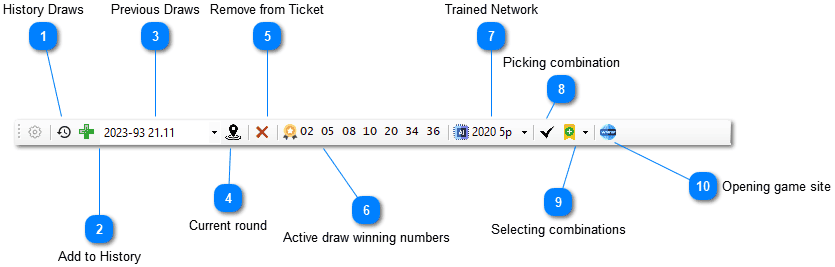 History Draws
Form for maintaining a history of previous draws, with many useful tools.
Add to HistoryForm for adding drawings to the history. This procedure will be covered in next topic.
Previous DrawsList containing all previous draws in the history. If textbox is empty, it means ticket and winning combination are for the current draw. If not empty, ticket and a winning combination shown are for that draw selected from history.
Current roundClicking on this button (when it is enabled) will return you to the current draw. It is enabled only when previous draw is selected from the history list. All previous draws are remembered with the ticket made for that round, so it can serve as a quite useful reminder.
Remove from TicketUse it to quickly remove the lotto combination in a current ticket.
Active draw winning numbersIf current drawing is selected, this button enables you to enter winning combination, and that combination will be than saved in the history and be shown in the list of Previous draws. All combinations in the ticket will be checked for matches and results presented.
Trained NetworkDefine, train and modify neural network used for prediction. If this button does not have textual identification of the network prepended (as in above image) it means no network exists, so you must define one to be able to start using the program to make smart pick of numbers for your own ticket(s).
 Picking combination
Shortcut for a form allowing you to easily pick your numbers with a dialog form explained in this topic.
 Picking combination
Selecting combinations
Drop down menu presenting you with option to add single
combination, wheeling, full systems, or the most probable, the
most hot, or the most due numbers combination(s).
You pick your numbers with a dialog form explained in
this topic.
 Opening game site
This button opens the browser with an URL you defined in system settings for that particular lotto game.
History Draws
The creation and maintaining of a substantial list of previous draws is an essential part of Stonito Lotto, as this list is crucial for good prediction.
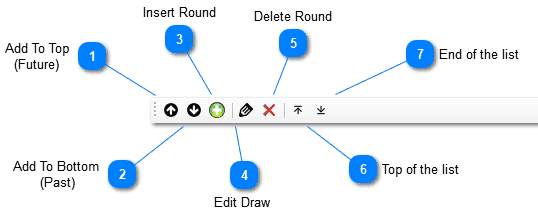 Add To Top (Future)
 Add one or more round to the top of the list. Orientation to the future is set to the dialog for entering new rounds.This means that every successive round entered will be placed on the top of the list
Add To Bottom (Past) Add one or more round to the end of the list. Orientation to the past is set to the dialog for entering new rounds. This means that every successive round entered will be placed on the end of the list.
Insert RoundInserts new draw in place of selected draw, date restrictions apply so new draw will have to fit between two adjacent draws. Also, renumbering happens automatically so newly inserted draw fits well with other existing draws.
Insert RoundEdit Draw Update selected draw, similar dialog as with entering new.
Delete RoundDeletes selected round, the automatic renumbering of all draws affected happen automatically.
Top of the listGo to Top of list
End of the listGo to Bottom of list
Context Menu
The creating and maintaining useful list of previous draws is very important part of Stonito Lotto, as it is essential for good prediction.
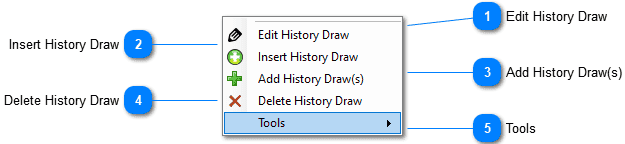 Edit History Draw
Change data about the selected history draw, similar when entering new.
Insert History DrawInserts new history draw in the place defined by the currently selected draw. Date restrictions are enforced so newly inserted draw must fit to the existing draws. Also renumbering of other draws happen to adjust for newly added draw.
Add History Draw(s)Append the list of history with one or more draws, to the bottom or the top of the list.
Delete History DrawDeletes the round from the history. Also renumbering of other draws happen to adjust for newly added draw.
ToolsIf you can find your game in the several supported websites (like alllotto.com), you will be able to automatically extract previous draws from those sites, on a current year basis. Whenever you click on the button, it scans the external website and extracts and appends rounds missing in your history draw. This option is available ony for registered users, relieves you of pain to manually fill the history list. Other options are self-explanatory and are used for maintaining the history list.
Adding New
When adding new or editing old round combinations, we use the same form. Although simple, this form has some useful and not so evident features explained below.
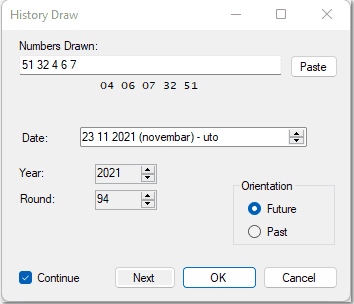
Numbers drawn are entered with a SPACE to separate them. You may enter the numbers in any order you want. Sorted numbers are shown below edit control and update on every change. If a combination is not correct or not finished for the particular system settings the message appears below in red color explaining what combination is missing to be correct.
Everything checked, no duplicates, all numbers within the limits of the system, all numbers there. The date is set automatically upon clicking on the Next button. Next pertains to the next draw, not the next day. The next draw takes into consideration active days on which draws for that game are happening.
Orientation for the future or the past, designate do you enter numbers on the top (more recent) or after the end (older). This orientation sets how you consecutively enter numbers, you will use Future if you enter draws from the oldest to the newest, and vice versa.
If Continue is checked, after entering one draw, the same dialog reappears allowing it to continue with the subsequent draw, until you hit the CANCEL button.
Paste button is not simply Paste from the Copy&Paste operation. Before actual pasting, pasted content is filtered for the main lotto games websites, to make it more acceptable to this edit box.
For example, commas are replaced with spaces, some markup characters are removed, etc. So, if you are copying a winning combination from some web page when you paste if the regular paste doesn't give you the desired result, you may try clicking this button instead.
Download online
History draws is the precondition for using artificial intelligence with Stonito Lotto software. Probably the easiest way to obtain the history draws is through an automated download from the internet.
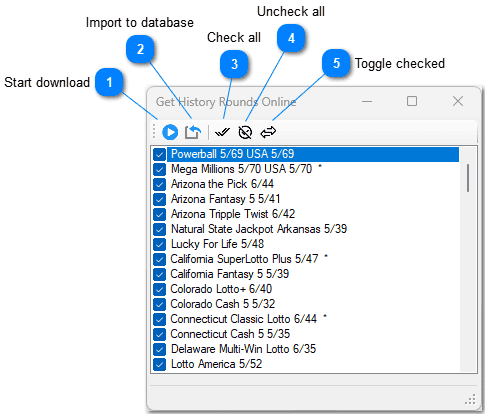 Start download
Click to download the available history rounds from the internet for the selected games. Only the new rounds (later than the last one already in the database) will be downloaded. It will take some time. Games that were unselected or didn't have any new rounds available will disappear from the list. The remaining games will show how many rounds are new and ready to import into the database.
Import to databaseClick to import available history rounds into the database. After this operation, the database will be updated, and newly downloaded history rounds will be available.
Check allClick to check all the games in the list.
Uncheck allClick to uncheck all the games in the list.
Toggle checkedClick to make all checked games unchecked and vice versa.