Ticket
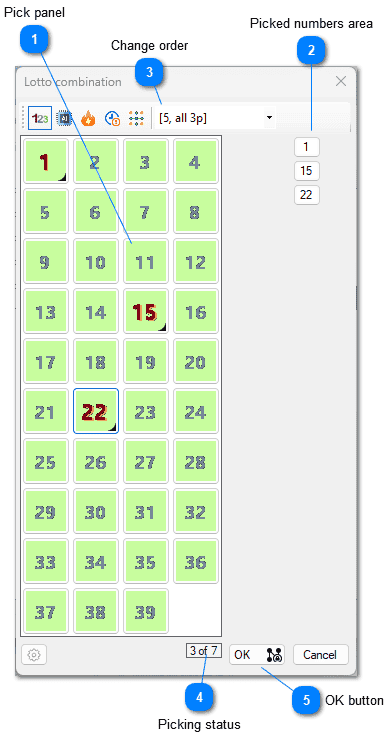
 Pick panel
By clicking on the number in the main panel you pick that number. If you click on the already picked number you unpick it. Picked number are visibly marked in this panel.
 Picked numbers area
By clicking on the number in tha picked numbers area you unpick it. That number is removed from this area and it's status updated in the Pick panel accordingly.
 Change order
Clicking this button opens the menu for switching between different orders of buttons keeps the collection of already picked numbers. It is an intuitive and the fastest way for selecting the numbers by consulting AI and statistics with no special effort. The available orders are explained in more detail here
 Picking status
 How many numbers were picked out of how many were required.
The same form is also used for wheeling and full
systems so the count of numbers to pick may be greater than
the actual drawn numbers for the particular lotto game.
 OK button
When you pick enough numbers the OK button will be enabled. If you have picked less numbers than the drawn numbers for the particular lotto game then clicking you will be taken to the dialog.
Picking Numbers
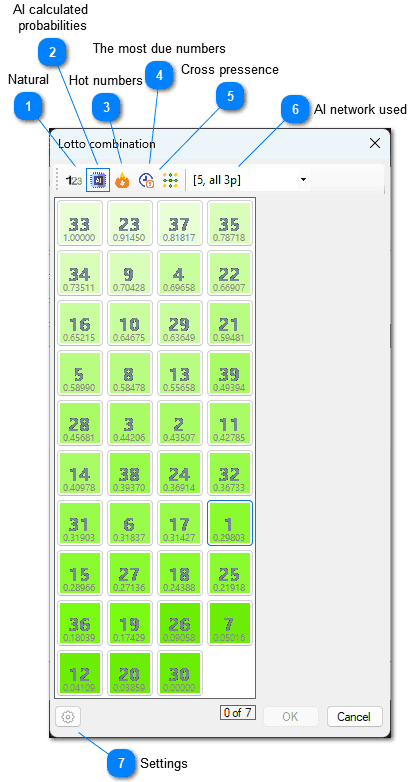 Natural
Order of numbers is a natural one.
AI calculated probabilitiesThe numbers are presented ordered by a highest value of probability of appearing in the next round, normalized between zero and one. So, zero value doesn't mean that this number is predicted as impossible to be drawn in the next draw, rather as a number with lowest probability of all other numbers. Similarly, value of one does'nt mean the number will be drawn for sure in the next round. It simply stands for the number with the highest probability of being drawn.This order is active in the image above.
Hot numbersThe number that was drawn the most time in the previous draws is on the top position, the number drawn the least times is at the bottom.
The most due numbersThe number that is the most due to be drawn up is on the top position, the number that is the least due is at the bottom. How much the number is due to be drawn is determined by an average frequency of its appearance in the past draws compared with how many last rounds it failed to appear. So, the number at the top is the one that has the greated difference between these two values.
Cross pressenceThis is special ordering, it changes whenever currently picked combination changes. The number that was present the most time in the last draw with all the currently picked numbers is at the top. If the currently picked numbers were not part of any winning combination in the history, this order is meaningless and the value for each numbers is NaN. With no picked numbers, the order is the same as for Hot numbers order. But with every picked or unpicked number this order changes.
 AI network used
This selection points to the network that is actually used in the "AI calculated probabilites" order.
 Settings
The picking order may be based on all previous draws in the history or for its subset. This form is explained in more detail here.
You can switch to different orders during number picking, and order of numbers on the left pane will change, but picked up combination is preserved. That's how you can select some number according to probability, and then switch to Hot order and select some numbers according to that criteria and so on.
Smart Combination Completion
This is where our Neural Network for Pattern is used.
The form contains the fixed length list (25) that are selected from a list of all possible combinations that contain the preselected numbers.
In your picking process you can open as many of those forms as you like.
They will all close when you close the picking form, or you can close them manually if you wish.
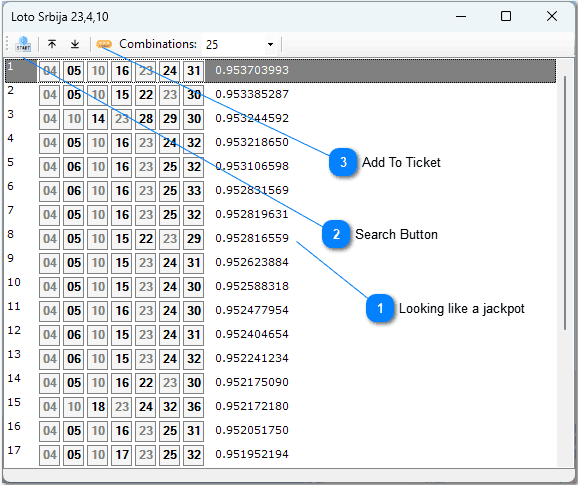 Looking like a jackpot
This is number in a range 0-1, where 1 represents the highest measure of looking like a jackpot (based on previous draws).
Search ButtonThis is a button to restart search process. All possible combinations containing preselected numbers are checked for their likeability using trained Neural Network for Pattern. You defines how many of the best looking combination will be included in a list. This process is automatically performed on opening the form. The number of combinations is preset to 25. If you change that number you will have to click this button to rerun the whole process.
Add To TicketYou may select one or more combination from the list and click this button, and those combination will be added to your current ticket. Pressing SHIFT and clicking the mouse or pressing SHIFT and one of the arrow keys (UP, DOWN, LEFT, and RIGHT) extends the selection from the previously selected item to the current item. Pressing CTRL and clicking the mouse selects or deselects an item in the list.